
Historical Newspapers
How to compare paid newspaper archives before you subscribe
Compare paid newspaper archives by exact title coverage, issue gaps, search tools, access, and current subscription terms before you spend money.

On this page
- Start with the title and date you actually need
- Treat advertised collection size as a starting point
- Check exact title coverage before you search names
- Find issue gaps instead of assuming a date range is complete
- Compare Newspapers.com for broad consumer searching
- Compare GenealogyBank for newspaper and genealogy searching
- Compare ProQuest for library and institutional access
- Compare search tools by the kind of failure you expect
- Read access terms as part of the research fit
- Reframe the choice as a coverage decision
- Try the comparison on one issue this week
- Keep the limits beside the result
- Sources
A paid newspaper archive can save you an afternoon, or it can give you a polished search box for a title that stops years before the event you need. The difference usually appears at the newspaper-title level. A broad claim about millions of pages does not tell you whether the *Cedar Rapids Gazette* includes the month you need, whether Sunday issues are present, or whether a particular page can be downloaded.
This comparison is for the point when you have a likely newspaper title, a date range, and a reason to consider paying. It covers Newspapers.com, GenealogyBank, and ProQuest Historical Newspapers because they represent different access models and different kinds of coverage. The aim is not to name one universal winner. Your best choice depends on the title, the missing issue, the search problem, and whether you can reach a library subscription. Before paying, confirm the route against your coverage map and check free and library access for the same title and dates.
Start with the title and date you actually need
Write down the newspaper title as it appeared on the masthead, the town and state, the event date, and the dates when a notice might have been printed. If you are looking for an obituary, the publication date may be one or more days after the death. If you are looking for a marriage announcement, the article may appear after the ceremony, and an engagement notice may have used different wording months earlier.
Add likely title variants to your note. A paper may have changed its name, merged with another paper, issued a morning and evening edition, or printed a Sunday title separately. Keep the variants visible rather than choosing one modern spelling and forgetting the rest. A provider's title page may list the publication under a catalog name that differs from the masthead you remember.
Your comparison question should be narrow: which service gives me a reasonable chance of seeing this title, this date range, and this page? That question is more useful than asking which archive is largest. It also keeps a tempting free trial from becoming the reason you change your research question.
Treat advertised collection size as a starting point
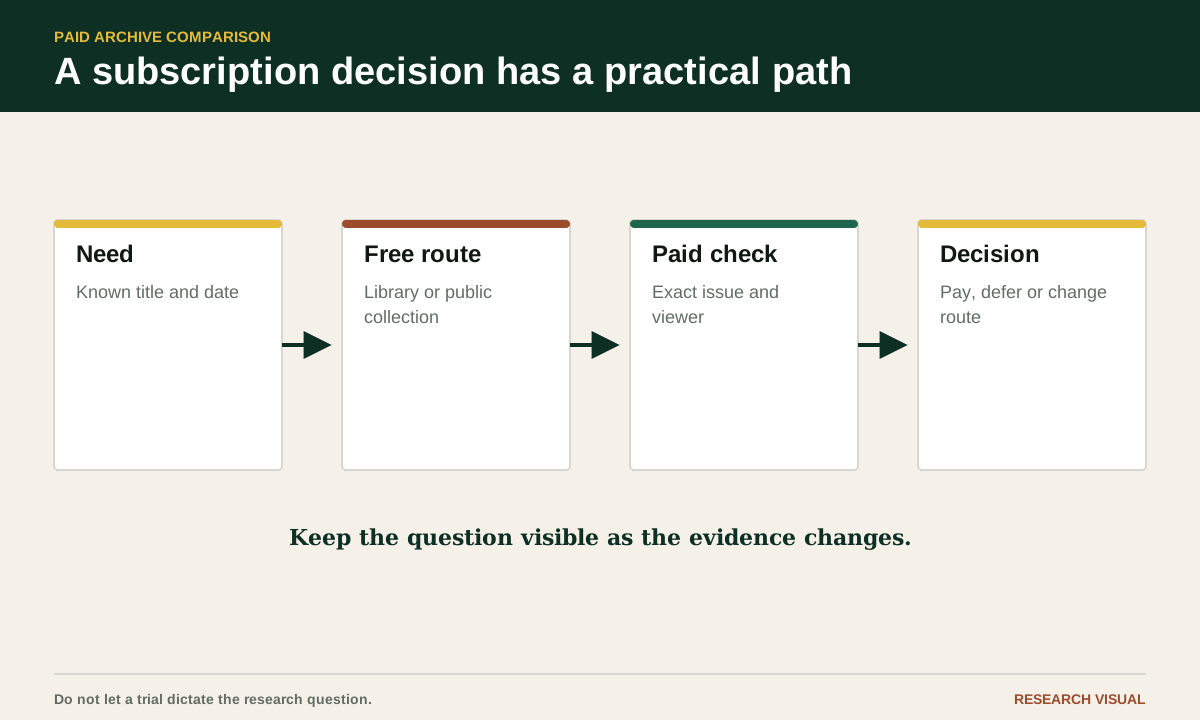
These services describe different products, and their collection summaries are not interchangeable. Newspapers.com paper records show title-specific information such as a publication's place and date span; for example, its Kansas City Weekly Journal archive record gives a stated run and lists related paper names. GenealogyBank publishes listings by state and city; its Illinois newspaper page shows how to locate a candidate title and inspect the publication information shown for it. ProQuest separately describes Historical Newspapers: U.S. Collection and Newspapers.com Library Edition, a library-distributed product; ask which exact product your institution provides.
Those statements answer a broad question about the service. They do not answer your title question. A single large collection may have no pages from your county, while a smaller institutional database may have a long run of the exact regional daily you need. A title count can also include titles with short runs, partial dates, multiple editions, or material that is searchable but not available through the access route you have.
Use collection size to make a shortlist. Then leave it behind and inspect the title record, date range, issue list, and access conditions for your newspaper. If you find a promising issue, record the page and wording using the newspaper evidence guide rather than relying on the provider's highlighted result.
Check exact title coverage before you search names
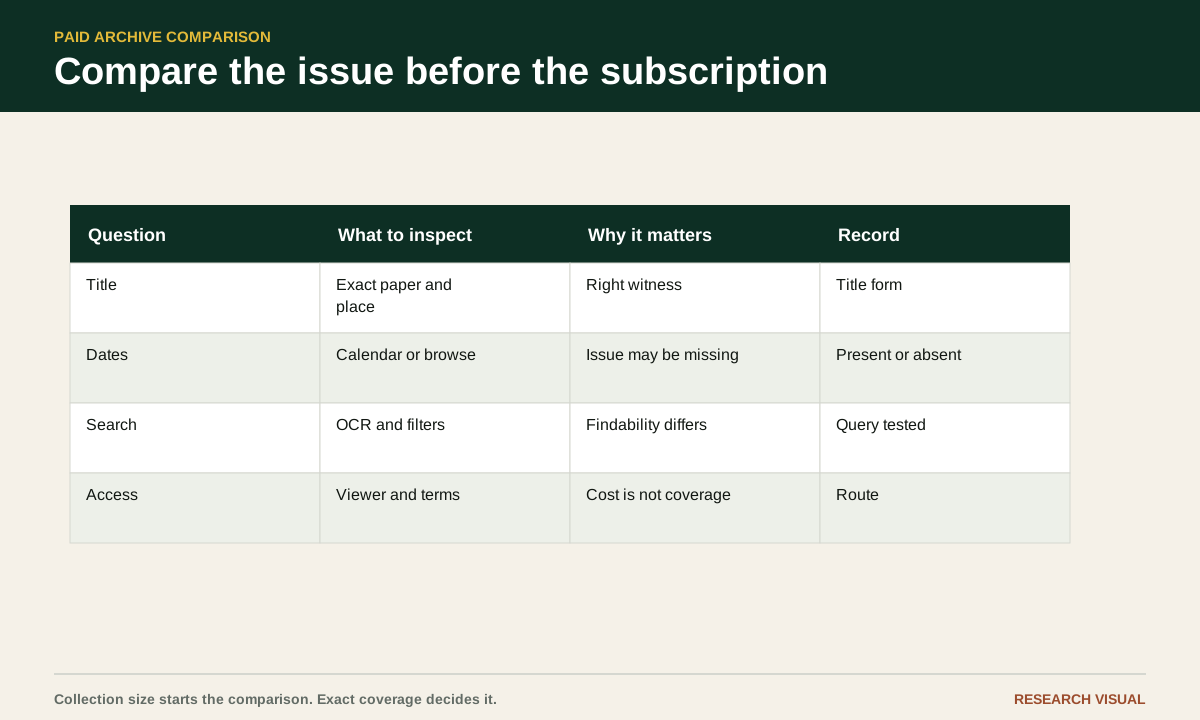
Search for the newspaper title itself before searching for your relative. Look for a provider title page, a browse-by-title result, or a collection list that names the paper and gives a date range. Record the title exactly as shown, including city, state, alternate names, and any note about editions.
A title appearing in a provider search does not prove that every issue is present. Open several dates near the beginning, middle, and end of your target range. If the site has a calendar or browse view, use it. If it shows only a general date span, test dates manually. Choose a date you know should have been published, such as a weekday, and a date when you suspect a notice appeared. Check whether the issue opens to page images, an article view, or only a search result.
Compare title records across services. One archive may list a title under an abbreviated name. Another may combine a daily and weekly edition. A third may have the title in a library product rather than in its consumer site. Copy the title record URL into your research note so you can return to the same evidence.
This is also where you catch a neighboring paper problem. A result from the same state can look promising while coming from a city several counties away. That paper may have reprinted the item, but it is a different source and should not be treated as the missing local issue.
Find issue gaps instead of assuming a date range is complete
An archive's date span is an outer boundary, not a promise that every issue inside it is online. Missing dates can result from incomplete microfilm, damaged originals, an edition that was not filmed, a digitization batch that has not been added, rights restrictions, or a provider's decision to license only part of a run.
Look for gaps in at least three ways. Browse the date calendar around your target. Search for the exact date as a date filter rather than relying on a keyword hit. Then open adjacent issues and note the page count or page navigation. If March 4 and March 6 are available but March 5 is not listed or cannot be opened, record “March 5 not located in this route”. Check the paper's issue schedule and another holdings source before calling it a gap in the surviving run. If March 5 opens but page 6 is missing, record the page gap separately. Treat these dates as a hypothetical example, not a report of checked issues.
Pay attention to weekdays. A run may contain Monday through Saturday issues but omit Sundays, or it may contain a Sunday supplement under another title. Holiday publication schedules can create real gaps. A paper that published irregularly during an early period may not fit the calendar you expect.
Do not interpret zero results as proof that the issue is missing. OCR may fail on a dark scan, a personal name may be misread, or the item may be filed under an edition label. A date browse check is stronger evidence of a gap than a failed name search.
Compare Newspapers.com for broad consumer searching
Newspapers.com offers an individual-access service with searchable paper records. Those records can help you check the named title, place, stated date span and paper history before searching, as the Kansas City Weekly Journal record illustrates. The Newspapers.com Help Center documents searching, the viewer, downloads, clippings, alerts, account support and subscription options. Use the provider's own title record to check whether your paper and dates are represented; this example describes one title only and is not a coverage claim for other papers.
For a title comparison, use the paper filter first. Search a rare phrase or a distinctive surname only after the title and date range are constrained. Open the full page rather than relying on the highlighted snippet. Check whether the viewer lets you move through nearby pages and whether the page image is clear enough to read an advertisement, column heading, or handwritten mark.
Check the provider's current subscription and account pages immediately before subscribing. Record the exact product, billing period, cancellation instructions and content included; offers and terms can change. The Newspapers.com Help Center links to the service's subscription and account information.
A broad consumer archive can be a good fit when you need several unrelated local titles or when page-level browsing matters. It may be a poor fit when your exact title is absent, the target dates are missing, or your institution already provides the same pages through another product.
Compare GenealogyBank for newspaper and genealogy searching
GenealogyBank provides online newspaper search and state-and-city newspaper listing pages; examples include its Illinois listings and New Bedford Gazette archive page. Start from your ancestor's place and inspect the linked publication information. Do not treat a statewide date range or a provider's current collection summary as proof that a particular title or issue is available to your account.
Use GenealogyBank's linked state and city title pages, such as its New Bedford Gazette archive page, to look for your paper. Test a known date before entering a full name. Then try two searches with different levels of specificity: a surname alone within the selected title, and the surname with a town, occupation, or relative. This gives you a quick sense of whether the search tool is returning a manageable set of results or whether OCR noise is overwhelming it.
Look at the result's relationship to the page image. A transcript can help you find a phrase, but the image tells you whether the article is a notice, an advertisement, a legal item, or a story about someone with the same name. Save the title, date, page information, and result URL while you can see them together.
Before enrolling, read GenealogyBank's current membership, billing and cancellation terms and confirm which content the plan includes. Do not rely on a remembered offer or a search snippet; the terms shown when you subscribe are the ones to record.
GenealogyBank may suit a project centered on notices, obituaries, and local newspaper material when the exact paper and dates are present. It does not become the right choice merely because a broad surname search returns many hits.
Compare ProQuest for library and institutional access
ProQuest offers multiple newspaper products, so "ProQuest access" by itself does not identify the collection you can use. Its U.S. Collection page provides a title list, and the provider describes separate Global products. ProQuest describes Newspapers.com Library Edition as a separate product distributed to libraries, with its own title list. Ask for the exact database or edition name before relying on an institution's subscription.
The first question here is access. Ask your library or institution whether you can use the named ProQuest product and whether access is on-site, remote, or limited to particular account holders. For example, ProQuest identifies its U.S. State Collections as intended for U.S. public libraries, nonprofits and K-12 schools; that description should not be taken to mean that every institution has every state collection.
The second question is title coverage. Use the provider's relevant title list as a catalogue, then test the interface available through your institution. Confirm the product includes the newspaper, target date and page images. The U.S. Collection title list and Newspapers.com Library Edition title list refer to different products, so check the edition name as well as the paper.
The third question is workflow. ProQuest's guide for Historical Newspapers users distinguishes page-level and article-level newspaper material. Your institution's interface and included features depend on the product it licenses. Before relying on a result, test how its date and page information appear, whether you can inspect the full newspaper page, and what saving or citation options the interface actually provides.
Existing institutional access may let you consult a product without starting a separate individual subscription, but availability depends on your institution and its license. Do not compare a product catalogue with a consumer subscription offer as if they were the same purchase.
Compare search tools by the kind of failure you expect
A search box is only as useful as the error it helps you recover from. Newspaper OCR often turns a surname into a string of unrelated characters. A provider may search a transcript, a page region, an article record, or a combination of those layers. The interface may allow exact phrases, date filters, title filters, location filters, proximity, or browsing. Check the help page for the features you actually need instead of assuming that two search boxes behave alike.
Run the same small test in each service. Use the newspaper title, a date window of a few weeks, and a phrase that might appear in the article. Try the surname with one letter changed, an initial, and a likely relative. If the provider supports exact phrases, search a short phrase rather than a whole sentence. Then browse the issue manually and look at the page where the result should be.
Record what happened. Did the service find the result because of OCR, a human-created index, or a page browse? Did it show a page number? Could you see adjacent pages? Could you save an image or PDF? Could you return to the same result without repeating the search?
The right archive is often the one that gives you the clearest recovery when search fails. A fast exact match is helpful. A usable browse calendar may matter more for a badly scanned local paper.
Read access terms as part of the research fit
Access has at least four parts: who can use the archive, which content the account includes, how long access lasts, and what happens when a trial or subscription ends. A page may offer a free trial while the title you need requires a higher tier. A library database may be available only from inside the building or through a resident login. An institutional database may permit viewing and downloading for research while limiting redistribution.
Check the provider's current subscription or account page immediately before you subscribe. Note the displayed plan name, billing period, trial condition, cancellation instructions, and any statement about included newspapers. Do not rely on an old blog post, a search snippet, or a price remembered from a previous project. This article intentionally does not list prices because offers and billing terms change.
Save the access date in your research log. It tells a later reader when you checked a title and helps explain why your result may look different after a catalogue update. If you are working through a library, record the library name and database name, not a personal login.
Reframe the choice as a coverage decision
Compare a subscription by the evidence it lets you inspect. For the issue that matters, check exact title and date coverage, completeness, image quality, search recovery, and access terms. Brand reputation comes after those questions. A collection's overall title count does not establish that the item you need is present.
Make a small comparison table with one row per provider and these columns: exact title listed, target issue present, nearby issues present, page image readable, search features useful, download or stable link available, access route, current terms checked, and unresolved limits. Use plain entries such as "yes," "no," "unclear," or "not tested." The table will expose a missing issue faster than a paragraph of marketing copy.
If two services contain the same issue, compare the page image and the way each service lets you cite or return to it. If only one contains the issue, record that fact without calling it the best archive overall. Your research question may change next month.
Try the comparison on one issue this week
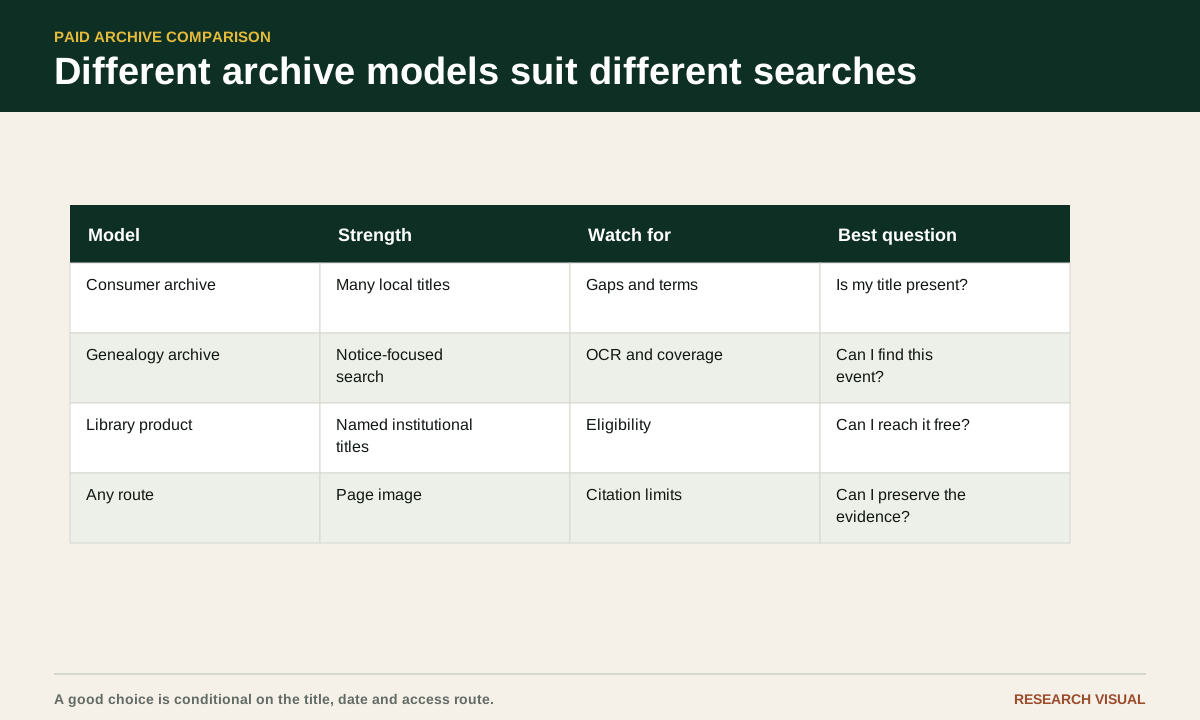
Choose one newspaper and one date that matter to your project. Before starting a trial, write the title, city, date, page if known, and two search phrases. Check the official title pages for Newspapers.com, GenealogyBank, and any ProQuest database available through your library. Open the date or the nearest issues in each service.
For each service, record whether the issue is present, whether the page you need opens, whether the image is readable, and whether the search result leads back to the page. Test one name search and one phrase search. Note the result count only as a working observation, not as a measure of archive quality. Save the title record or issue URL and the date you checked it.
Stop when you can answer three questions: which services have the exact issue, which one gives you the clearest page image, and which access route fits your time and account. If none has the issue, keep the comparison table. It is evidence for your next library request or microfilm search.
Keep the limits beside the result
Paid access does not repair a missing original, a poor scan, a publication gap, or an OCR error. A result can be misdated, clipped, repeated in another edition, or attached to the wrong person. Treat the page image as the primary object you inspected and the transcript as a finding aid.
Record the limits in the same note as the result. Write "page 4 not available," "Sunday issue not listed," "title record gives range only," or "image too dark to read" when that is what you found. A clear limit is more useful than a vague statement that the archive had incomplete coverage.
The archive that helps you find a page and the archive that lets you preserve a durable citation may be different. Keep both roles in view. When you have the newspaper, date, page, wording, image or link, access date, and uncertainty in your notes, the subscription decision becomes a small research choice instead of a gamble.