
Free state collections
How to find and search your state's free historic newspaper website
Find the free digital newspaper website for your ancestor's state, learn how its search behaves, and check its coverage before deciding a family is missing from the papers.

On this page
- Find the site for your ancestor's state
- Learn the search before you use it
- Worked example: compare a failed phrase search with a useful lead
- Why state sites exist alongside Chronicling America
- Use the words and place names of the period
- Browse when the search lets you down
- Narrow a common surname with filters
- Test the search with a phrase you can see
- Check coverage title by title
- Use article results, clipping and correction tools
- Record what you searched on each site
- When the state site has nothing
- Sources
Open the NEH state newspaper-project list and find the institution listed for your state. Treat it as a starting lead: the list warns that old contacts and links may be out of date. On the institution's current website, look for its digital newspaper collection.
If you know the newspaper title, check its issue list for your target date first. If you only know a town and state, search the web for the state name plus digital newspapers, then use the collection's title or place list. Begin with one likely paper and a short window around a known event; if the date is unknown, start with a documented year of residence.
Read the site's help, then try your ancestor's surname with one town or occupation word, using only the search options the help documents. Keep the exact query and filters in your notes, including a blank result.
Find the site for your ancestor's state
Start with three routes:
- The NEH United States Newspaper Program page, to identify the institution that led newspaper work in your state.
- The state institution's current newspaper research guide, to follow its own links to digital collections and search help.
- A web search for the state's name with "digital newspapers", "historic newspapers" or "newspaper archive", looking for a site run by a state library, state archive, historical society or university.
Some states have more than one site. A university may digitise its region's papers, a city library its city's, and a historical society a different selection. Our guide to free and library newspaper access explains how to find these routes and how to ask a librarian which collection covers a particular title.
Learn the search before you use it
Search screens differ in what they look for and how they read your terms. Read the help page and try a short test search before searching for your family.
Check these points:
- Whether quotation marks search for an exact phrase, and whether very common words are ignored.
- Whether there is a way to search for words near each other, and how to set the distance.
- Whether AND, OR and NOT are supported, and whether they must be typed in capitals.
- Whether wildcards are supported, and with which character.
- Whether results are shown by page or by article, and whether you can sort by date.
- Which filters exist: title, place, date, language, section.
South Carolina's advanced search help directs readers to a dedicated phrase box and a separate words-near-each-other option with a numeric distance. Use those documented controls rather than assuming quotation marks work in every box. The help also recommends period vocabulary and place names.
Many state sites run on shared software. A knowledge-base article from the Veridian software company, on searching and browsing a Veridian collection, describes advanced search options that let users narrow by date range, region, language, title and content type, choose which fields to search, and sort by relevance or date. It notes that where articles have been identified on a page, users can search and view by article, clip article text, and add tags or comments. It also says that options vary by collection, which is the main point to remember.
Worked example: compare a failed phrase search with a useful lead
Everything in this example is invented: the state site, its interface, the person, the town, the newspaper and all results described. No real website, collection or newspaper is described, and none of these items exists anywhere.
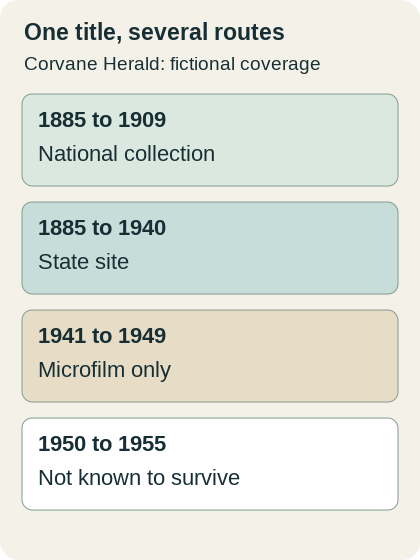
Suppose you are researching Hannah Kessler, a schoolteacher in the invented town of Corvane in the 1910s. You have searched Chronicling America and found that it holds Corvane's paper only to 1909.
You find an invented state site, "Northmere Digital Newspapers", run by the state library. Its title list shows the Corvane Herald digitised from 1885 to 1940. Its help page says that quotation marks search for an exact phrase, that a tilde and a number search for words near each other, and that results are shown by article rather than page.
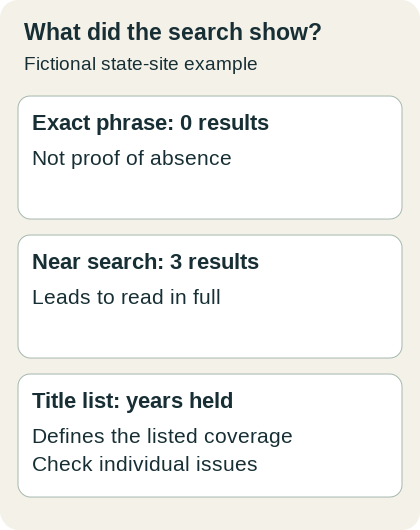
You search "Hannah Kessler" and get nothing. You then search Kessler teacher within 10 words, limited to the Herald from 1910 to 1920, and find three articles, including one from 1914 headed "Teachers Engaged for Coming Year", which lists "Miss Hannah Kessler, Corvane school".
Here is what you can record. The Herald of a stated date in 1914, on the invented state site, printed a list of teachers engaged for the coming year that included Miss Hannah Kessler at the Corvane school.
Here is what you cannot record. The exact-phrase search failed, which might mean optical character recognition (OCR), the machine-generated text made from a page image, misread the name, a middle initial interrupted it, or the site handles quotes differently from what you expected. It does not mean the name never appeared. And the list itself shows only that the paper reported her engagement for a coming year, not that she taught throughout it.
The lesson is about the tool as much as the person: the same search can behave differently on different sites, and the site's own help and title list decide what a result means.
Why state sites exist alongside Chronicling America
The National Endowment for the Humanities describes the National Digital Newspaper Program as a partnership with the Library of Congress and state projects, in which state partners select and digitise historically significant titles, and the Library aggregates them in Chronicling America. It aims to have every state and territory represented, with one organisation per state receiving an award.
Before that programme, NEH's United States Newspaper Program ran from 1982 to 2011. It funded a project in every state, usually run by the state's largest newspaper repository, to locate, catalogue and microfilm newspapers. The NEH page lists each state project with a contact and website, notes that some entries mention participation in the digital programme, and warns that email addresses and links may not be current. It also says the microfilm produced is generally available through interlibrary loan.
Many of the same institutions have built their own free sites, often including titles and years beyond what they contributed to Chronicling America. The Minnesota Historical Society, for example, points researchers to its own Minnesota Digital Newspaper Hub in a research guide on orphan train newspapers, linking it as a searchable collection of Minnesota newspapers. Check the Hub itself for the title and issues you need rather than treating a guide's broad date range as complete coverage.
Use the words and place names of the period
A search box only finds the words that were printed. The South Carolina help page gives a small table of modern terms and their historical equivalents, such as "filling station" for a service station and "suffrage" for voting rights, and notes that Oklahoma was called "Indian Territory" and "Oklahoma Territory" before statehood.
The same thinking applies to your family. Towns were renamed, counties were divided, and a neighbourhood might be known by a name that no modern map shows. A married woman may be printed as "Mrs. John Kessler" rather than under her own given name, and a courtesy name like that does not by itself tell you which woman is meant. An occupation may be printed in an old form, such as "teamster" (a driver working with a team of animals), "drayman" (a cart driver) or "operative" (a worker, often in a factory). Before you search, list the place names, spellings and occupational words your ancestor's neighbours would have used, and search each.
If the paper was printed in another language, search in that language. Our guide to immigrant and foreign-language newspapers explains how to approach searches in another language and script.
Browse when the search lets you down
Keyword search depends on OCR, which can be poor on old, faded or tightly set pages. Most sites also let you browse, so look for that option too. The Veridian article describes date browsing, which moves through a collection in time order and retrieves issues by date, and title browsing, which shows all the issues held for one paper. It says these are particularly useful for researching a specific period or title.
Browse when you know roughly when something happened: the weeks after a death, the month of a wedding, the summer a school term began. Choose a short window around a known event, then scale your browsing to the available issues and the time you have. Start with one issue and record where you stop; expand when the first window does not answer your question. Note the issues you browsed in your search log, so you know later that a gap was read by eye and not just searched.
Narrow a common surname with filters
A common surname on a large state site can return thousands of results. The Veridian article describes facets that show how results are spread across fields such as date, publication and place, and let you narrow by those fields. Use them before you start reading: limit to one title, then to a span of years, then sort by date.
Add a second term that only your family would share: a street, a business, a spouse's name or the name of a small settlement, using the site's near-each-other option if it has one. Keep every result attached to a candidate rather than to your ancestor until another record connects them. Our guide to finding an ancestor with a common name explains how to keep similar people apart.
Test the search with a phrase you can see
The quickest way to learn how a site behaves is to test it on a page you have already read. Open any issue of a paper you care about, pick a distinctive phrase you can see clearly on the page image, and search for it. Then search for it with quotation marks, without them, and with the words in a different order.
A successful test shows only that phrase and page were retrievable under the query forms you tried. It does not establish how reliably the site finds other names or pages. If only one query form retrieves it, record that observation and try the documented options on your family search. If none retrieves it, recheck the filters and help, inspect any available OCR text, and browse the issue. Failure alone does not diagnose an OCR or search fault.
Our guide to searching when OCR gets names wrong explains how to work around misread names once you know a site's limits.
Check coverage title by title
A state site's front page may give the total number of titles and pages, but what matters is the coverage for your town and years. Open the site's title list, find every paper published in or near your ancestor's town, and note the first and last issues digitised and any gaps.
Compare this with Chronicling America and with any other site covering the state. The same title may be split between collections, with some years in one and some in another. Record which collection holds which years, so that you search the right one for each date. Our guide to building a newspaper coverage map shows how to lay this out.
If a title you need is missing, ask the state institution about the exact title and dates rather than assuming they are scheduled for digitisation. In the meantime, NEH says the microfilm from the earlier state projects is generally available through interlibrary loan.
Use article results, clipping and correction tools
Where a site identifies separate articles, results may point to a single item rather than a whole page. That is convenient, but check the full page image too. An article boundary drawn by software can cut off a heading, a continuation or a neighbouring item that matters.
Some sites let users add tags or comments, save articles to a list, or clip article text. The Veridian article mentions all of these, noting that article-level searching depends on articles having been identified in the source data. Some sites also let users correct OCR text; the help page will say. If you correct or tag a name, you help the next person searching for that family. If you save a clipping, also save the full page citation, since a clipping alone loses its context.
Record what you searched on each site
Because each site behaves differently, a search log matters more than usual. For each search, record the site, the title or titles selected, the date range, the exact terms, whether you used quotation marks or a proximity option, and the number of results. Copy these labels into your notes: site; newspaper title; dates; exact query; search mode; filters; result count; issues browsed; next check. Note any issues you browsed by hand.
That record lets you say exactly what a blank result means: "No result for Kessler with teacher within 10 words, Corvane Herald 1910 to 1920, Northmere site; 1912 issues browsed by hand." Our guide to verifying and preserving a newspaper discovery explains how to cite what you find, including the site and the date you viewed it.
When the state site has nothing
If neither the state site nor Chronicling America has your paper for the years you need, the paper may still exist on microfilm, in print at a historical society, or in a subscription database that your library offers. The NEH page on the United States Newspaper Program notes that its catalogue records were added to WorldCat, which can help you find which libraries hold a title.
Search WorldCat or your state library's catalogue for the newspaper title, note which institutions hold it and in which format, and ask your library about interlibrary loan of the microfilm.
Leave with a coverage note and next search
Choose one ancestor and the state and town where they lived. Find the state's free newspaper site using the routes above, and open its search help.
Pick a distinctive phrase from any page on the site and test how the search handles quotation marks and word order. Then open the title list and record the digitised years for each paper in or near your ancestor's town.
Search your ancestor's surname with the town name, using the site's proximity option if it has one, limited to those titles and years. Record each search in a log, including those that return nothing.
If you find nothing, compare the site's coverage with Chronicling America's for the same titles, and look up the title in WorldCat to find microfilm for the years neither site covers.
Sources
- National Endowment for the Humanities: National Digital Newspaper Program
- National Endowment for the Humanities: United States Newspaper Program
- Minnesota Historical Society: Orphan trains research guide, newspapers (mentions the Minnesota Digital Newspaper Hub)
- South Carolina historic newspapers: Advanced search help
- Veridian: Searching and browsing through a Veridian collection (2025)